
Triggers
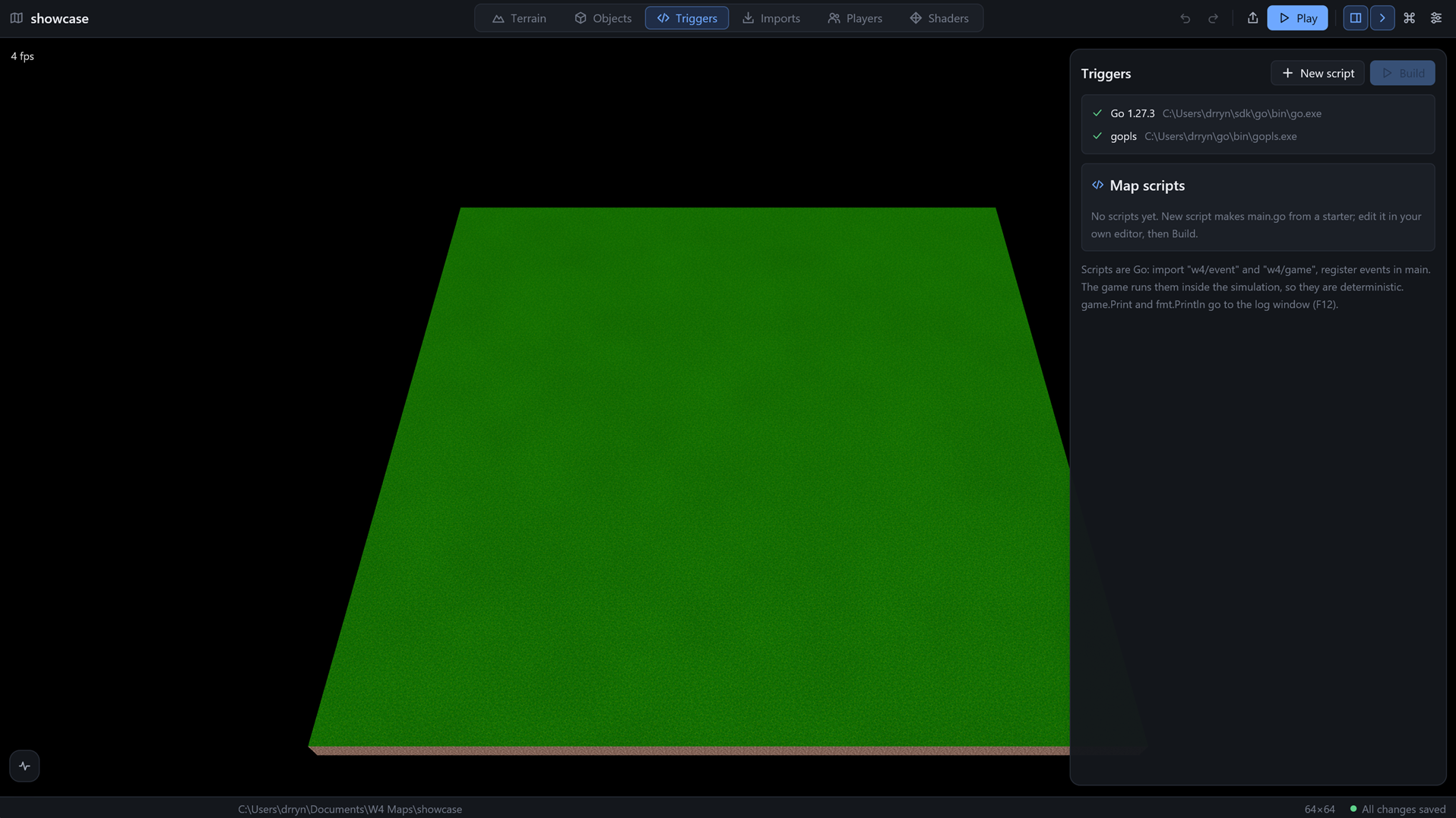
The Triggers module (Ctrl 3) is not a code editor. You write Go in the editor you already use, and this module looks after the map's scripts/ folder: it creates files, builds them and checks that your tools are installed. The 3D view stays behind the panel, since the map is what your scripts act on.
For a walk-through, see Your first script. The scripting side is covered in the scripting guide.
The script compiler card
At the top of the panel, the Script compiler card has two tiles, Go (recommended) and TinyGo. Click one to build the map's scripts with it; the choice is saved with the map. Each tile says in a line what it is for and where it stands:
- Ready, with its version.
- Not installed yet, with an Install button. One click downloads it from the internet and unpacks it into W4's data folder. A bar shows what is happening and how much has arrived, for example "12.3 MB of 45.6 MB". TinyGo builds through Go, so installing TinyGo also installs Go when it is missing.
Below the tiles, Code hints in your editor turns on gopls, Go's language server, which your code editor uses for completion and errors as you type. It is only offered once Go is there, and you do not need it to build.
The W4 API itself reads fine in any editor with no setup (JetBrains GoLand included). The scripts run as WebAssembly, so for the standard library to be read the same way, the editor also writes .zed/settings.json and .vscode/settings.json into the scripts/ folder, which set GOOS=wasip1 GOARCH=wasm and, with TinyGo, the tinygo build tag. In GoLand, the same is under Settings, Go, Build Tags & Vendoring (OS wasip1, arch wasm).
TinyGo also needs wasm-opt (part of Binaryen), which it runs on every WebAssembly build. Install on the TinyGo tile fetches it too.
Experimental: Native export
Under the compiler tiles is a switch, Experimental: Native export, saved with the map (native_export in map.toml, off unless you turn it on). It is for testing the scripts as a native FreeBSD program on a server you run yourself. While it is on, a warning card says what is lost: the script is not sandboxed, it is not deterministic so players can drift apart, it is never allowed in ranked or public games, and a server needs --allow-native-scripts to run it. A Build native button then builds scripts/native/freebsd-amd64 and shows what the compiler said. The switch is greyed out with "This Go cannot cross-compile for FreeBSD" when your Go cannot do that. Until the native host of the SDK exists the build is expected to fail, and its message says why; that is a result, not a fault. The command palette has Experimental native export on or off and Build the native FreeBSD program.
Build progress
While a build or an install runs, the status bar at the bottom of the window shows what it is doing with a small progress bar and the percentage, so you see it without opening anything. The Activity panel shows the same bar at the top (and the percentage in its collapsed header). Downloads show the real size ("12.3 MB of 45.6 MB"). The compilers report no percentage, so a build shows its stage and an estimate based on how long the last build took; it never claims to be finished before it is.
Scripts
The Map scripts card lists the .go files in the map's scripts/ folder, main.go first and the rest alphabetically. Each row shows its size and when it last changed, in your local time.
New script opens a small name field.
- The first script of a map is always
main.go. It starts from a short example with amainfunction: it prints a line at map start, spawns a footman, reports a death and prints the time every ten seconds. - Further scripts need a name, made of letters, digits,
_and-. The.gois added for you. They start with a small example that registers an event ininit, which the game runs beforemain.
Select a script to get its actions:
- Open in editor opens the file in your code editor, with the whole
scripts/folder as the project, so your editor's language server can complete thew4packages. Which editor is set under Code editor in Settings. The command can use{dir}and{file}where the folder and the file should go. Without a command, the editor trieszed, thencode, thensublon your PATH, and finally asks the system for its program for.gofiles. - Rename (the pencil) takes a new name.
- Delete (the bin) needs a second click.
Each of these shows a toast, and the Activity panel keeps a line for it.
Go or TinyGo
A new map uses Go; a map from before this setting keeps building with Go too.
- Go is the full standard toolchain. It builds in a fraction of a second and runs scripts about 15 times faster, but puts its runtime and garbage collector into every map, so
map.wasmis about 2.5 MB. - TinyGo makes the smallest maps, a few hundred KB, but takes 3 to 5 seconds to build and runs scripts slower. It supports less of the standard library: reflection is partial (
encoding/jsonandtext/templatemay not work) and some packages (net,os/exec) are missing.
Measured on a stress map (2000 units, 48 regions, 40 timers, a floating number on every hit; Windows PC, Ryzen 7 7700):
| Go | TinyGo | |
|---|---|---|
map.wasm |
2,490 KB | 197 KB (12 times smaller) |
| Compile (warm) | 0.3 s | 2.7 s (9 times slower) |
| One script call | 0.002 ms | 0.035 ms (17 times slower) |
| Script time per game second | 0.2 to 0.4 ms | 3 to 7 ms |
Both stay under 1% of a second at that load. Go is the default because it builds ten times faster and has far more headroom; choose TinyGo only when the size of the map file matters most.
Switching deletes the built map.wasm; the next build or Play makes it again with the new compiler.
Build
Build compiles every .go file in the folder into scripts/map.wasm with the standard Go compiler, for the target wasip1 / wasm, as a c-shared library. A successful build shows a toast with the size of map.wasm and the time it took.
If the build fails, the toast shows the first line that names a .go file, and the whole compiler output is in the Activity panel, one line each. Click the entry to unfold it.
Under the scripts, a line says where things stand:
- Not built yet; Play builds first.
- Changed since the last build; Play builds first.
- Built and up to date.
You do not have to press Build before testing. Play builds scripts that changed, and it refuses to start the game when the build fails. So the game you see is always the code you wrote.
Where the API lives
The Go API, the packages w4/event, w4/game, w4/player and w4/ui, ships with the editor. It is not copied into your map. The editor writes it once per computer into its data folder, and writes a small go.work file in the map's scripts/ folder that points to it. The map's own scripts/go.mod just says it requires w4.
That keeps your map small, and a new editor version brings the new API without touching your map. go.work belongs to your computer, so the editor also writes a .gitignore that keeps it out of version control.
Opening the module on a map that has scripts prepares the folder like this. If an older map still has its own copy of the API in scripts/w4/, the editor removes that copy and the replace line that went with it. Nothing else in your go.mod is touched.
Not built yet
GUI triggers, the point-and-click kind, are planned on top of Go. Reloading a script into a running game is not built either. For now you stop the game, build and play again.