
The editor
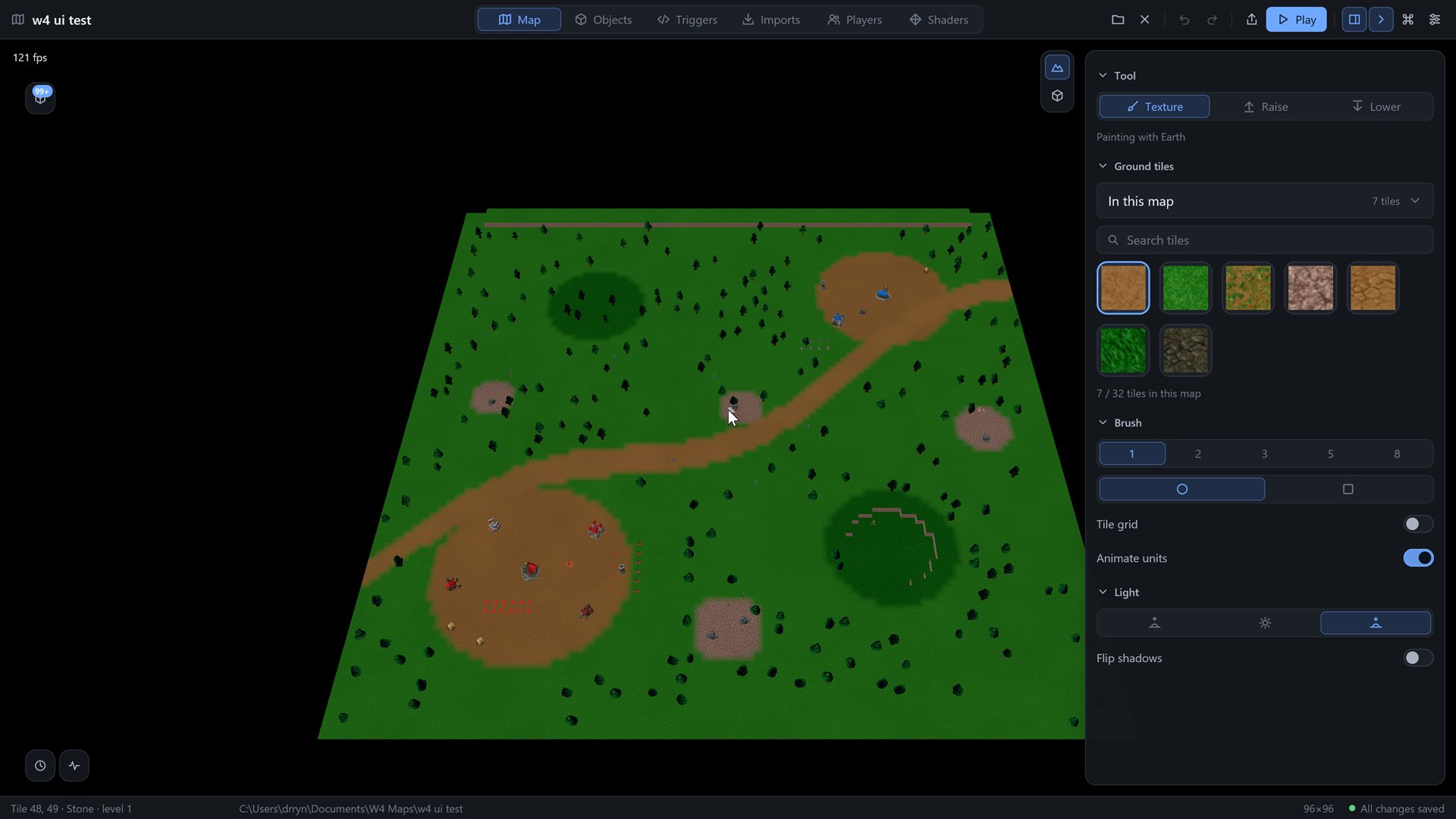
The Aqua IV Editor is where you make maps for the Aqua IV engine. It is one window. The 3D view of your map fills the middle, there is a top bar above it, and the tool panel for the current module sits on the right. Two small panels, History and Activity, float over the view.
You never press Save. The editor writes your changes to disk about a second after you make them, and it writes files in a way that survives a crash. Saving and safety explains what that covers.
The six modules
The tabs in the top bar switch between six modules. Ctrl 1 to 6 do the same from the keyboard (Cmd on a Mac). The 3D view keeps its camera when you switch, except in Imports, where it shows a model preview instead of the map, and in Players, which has no 3D view.
| Module | Shortcut | What it is for |
|---|---|---|
| Terrain | Ctrl 1 | Paint the ground, raise and lower cliffs, set the sun |
| Objects | Ctrl 2 | Define units, heroes, buildings and decorations, then place them |
| Triggers | Ctrl 3 | The map's Go scripts: the files, the build, the toolchain |
| Imports | Ctrl 4 | The models, textures and sounds inside the map |
| Players | Ctrl 5 | Names, colours, teams and start gold of the twelve players |
| Shaders | Ctrl 6 | The map's own look for units and terrain |
The rest of the editor
- The welcome screen, with your recent maps and the New map dialog.
- The top bar, panels and camera.
- The command palette and shortcuts.
- History and Activity, the two floating panels.
- Saving and safety: autosave, backups, crash saves, old maps.
- Settings.
- The model viewer, for looking at one model on its own.
- The files of a map and where the editor keeps its own data.
In this section
Welcome screen Recent maps, the New map dialog, opening maps and models, and what happens to older maps.Top bar, panels and camera The top bar, the status bar, the docked tool panel, the floating panels, and how the camera works in the 3D view.Terrain Painting ground, the tile picker with the eighteen Warcraft III tilesets, cliff levels, the brush, the grid and the sun.Objects Definitions for units, heroes, buildings and decorations, every field explained, and placing them on the map.Triggers The script manager for the map's Go files, the build, and the script compiler card with one-click Go and TinyGo.Imports The models, textures and sounds of the map: importing, the list and its filters, renaming, previews, sound gain, and bringing models in from Warcraft III.Players The twelve players, their names, colours and teams, and the map's start gold.Shaders The two shader slots, units and terrain, and how a map replaces the engine's look.History and Activity The two floating panels: History to jump back to any earlier state, Activity for a record of everything the editor told you.Settings The Editor tab and the Map tab of the settings window.Model viewer Open a single model, orbit it and play its animations.Files of a map What is in a map folder, what goes into an exported .a4m file, and where the editor keeps its own data.Command palette and shortcuts What the Ctrl+K palette lists, how to search it, and every keyboard shortcut of the editor.Campaigns The campaign page: a folder of maps as a graph of missions, choices and endings, with checks that name the node that is wrong.Saving and safety Autosave, atomic writes, backups, repair on open, and what happens if the editor crashes.