
Aqua IV
Spoken "Aqua Vier". Formerly Omicron W4.
A map editor and game engine for Warcraft III style maps, made for people who still love making them.
Paint a map, bring in the models you already have, write the rules in Go and press Play.
0.11 · 3 November 2026 · Alpha preview Test build
This version was built without the final optimisations, so the game runs slower than a production build will. It is for trying things out, not for measuring.
What makes it different
A few ideas W4 is built around.
Thousands of animated units
Units are animated and drawn on the GPU in batches, and far-away ones get simpler models. Big crowds stay smooth.
The command palette
Press Ctrl⌘K and type a few letters to jump to a module, run a command or open a recent map. The goal is that every action and setting ends up there.
Never lose work
The editor saves a second after every change and never leaves a half-written file. If it crashes, your changes are saved anyway, and History lets you jump back to any earlier point.
Imports that think
If two textures share a name, Aqua IV keeps both and points each model at the right one. Rename a file and everything that uses it follows, as one undo step.
One file per map
While you work, a map is a plain folder. To share it, export one encrypted .w4m file with the terrain, objects, scripts, shaders and models inside.
Native interface, no browser inside
The editor uses GPUI and the game uses Bevy UI. Both draw the interface on the GPU together with the rest of the frame, so there is no web page inside.
Built for multiplayer
The game simulation runs in fixed steps, separate from drawing, and gives the same result on every computer. Players send commands, scripts run inside it, and nothing else changes the game.
The things that made you give up on map making
Every one of them has an answer here.
In the editor
Nine small things you meet in the first hour. None of them is a big feature; all of them are why the hour is pleasant.
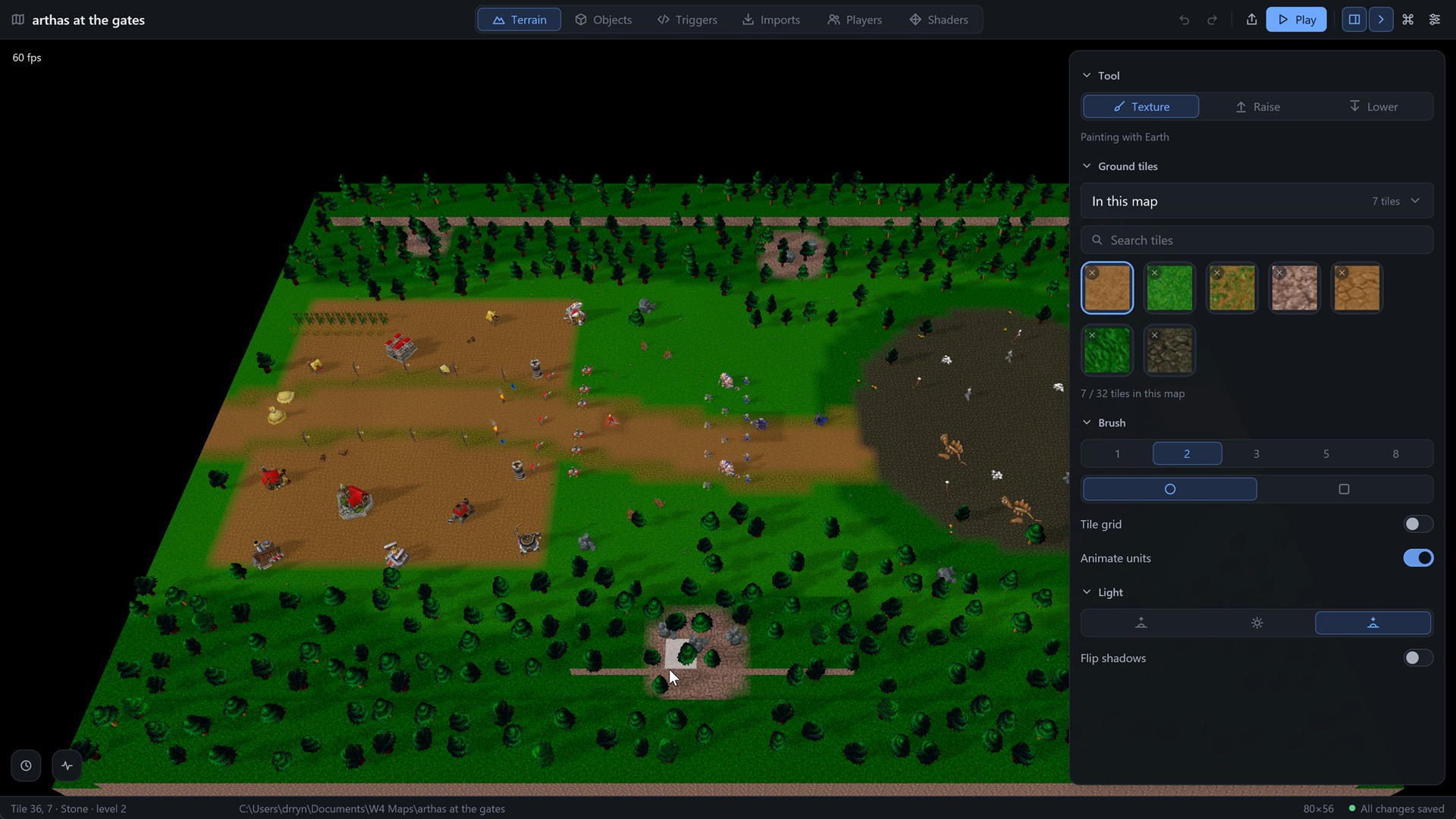
Paint with the game’s own ground
Thirty-two ground tiles from the Warcraft III tilesets, by category and with a search; a round or square brush from one to eight tiles; raise and lower cliffs with the same strokes.
Move the sun
Pick morning, noon or evening and flip the shadows; the 3D view follows at once. The game shows the same light.
Animated units in the map
Place a unit with a ghost under the pointer, turn it and give it an owner among the twelve players. The view animates them while you edit; a switch turns that off on a slow machine.
Unit definitions
A unit’s name, model, health, speed, attack, range, sight, cost, build time and what it trains or builds all sit in one panel, together with its hit sound and volume.
Open in your editor
One button opens the scripts folder as a project in Zed or VS Code with the Aqua IV API already known to it. Build checks the script on the spot and says what is wrong.
The status bar
It shows the tile under the pointer with its ground and cliff level, the map’s size, and whether everything is saved.
Twelve players in one panel
The Players module sets a name, colour and team for each of the twelve players, plus the map’s start gold. A unit on the map belongs to one of them, and allies never fight each other.
Your own pictures as ground
Any imported picture, WebP, PNG or BLP, can become a ground tile of the map with one command, and the Terrain brush paints with it next to the game’s own.
Recent maps on the welcome screen
Your recent maps, newest first, with a search; a new map by name and size; or a single MDX opened straight into the model viewer, without a map at all.
Use the models you already have
Aqua IV reads the MDX and MDL files the community has been making for twenty years, with animations, particles, ribbons and team colour. All 3,209 models in the game’s own archives load. You can import from your copy of Warcraft III with one click. Nothing of the game is shipped with Aqua IV and nothing needs converting.
- MDX 800 and MDL text, BLP textures
- Textures come along and the paths are kept for you
Press Play and you are in the game
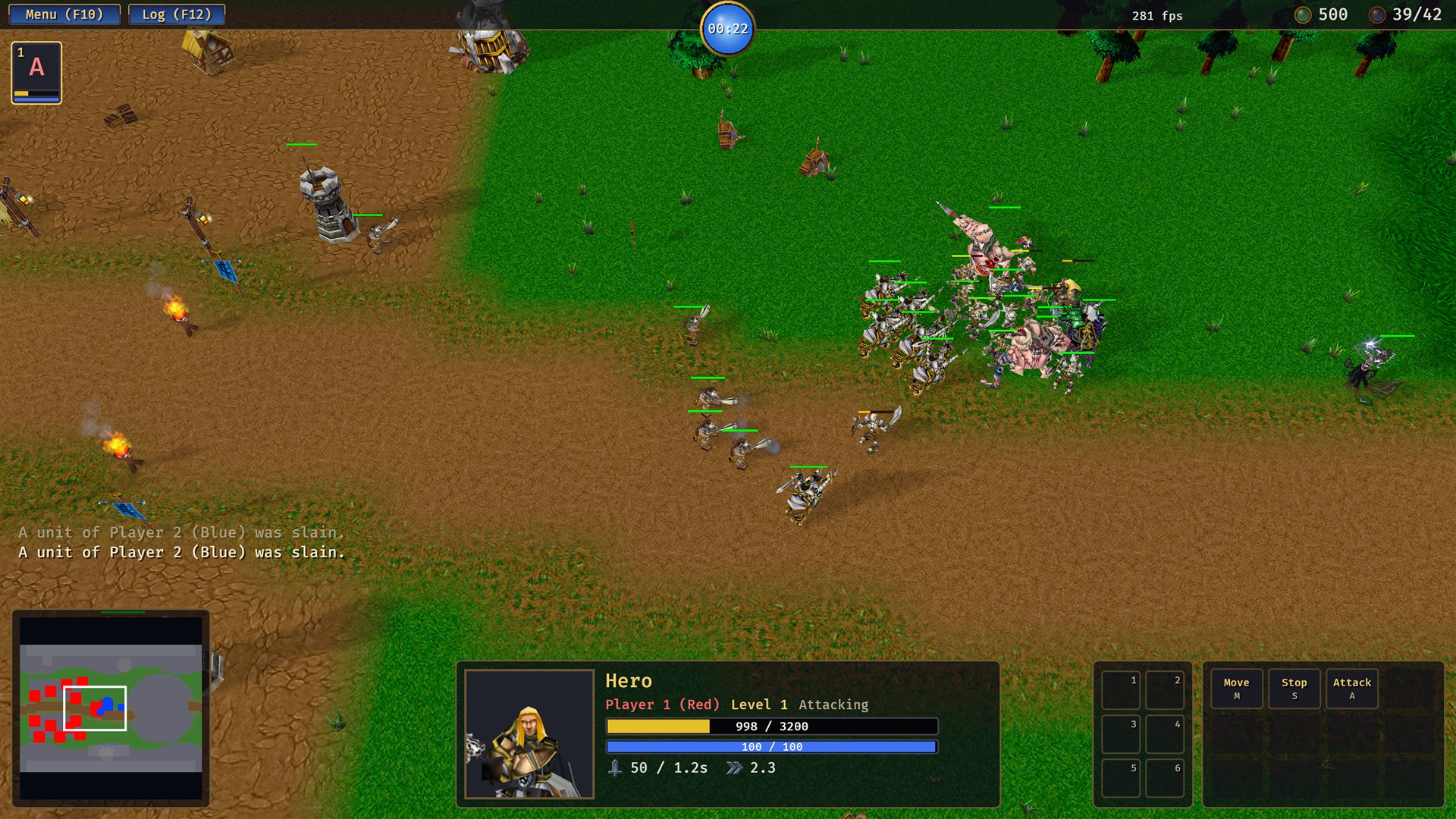
The engine opens your map in its own window, with a start screen, a minimap, a resource bar and a chat that understands slash commands. Change something and press Play again. It is the same game your players will get.
- A start screen with your map’s own preview
- Menu on F10 and a message log on F12
- Quests and panels from your own script
Look at any model before you use it
Open a single MDX from the welcome screen or the Imports list, turn it around, and play its animations one by one. Check that the textures were found and what the particles do before the model becomes a unit.
- Orbit with the mouse, zoom with the wheel
- Stand, Walk, Attack, Death and every other animation in one list
- Four backgrounds to judge it against
Go back to any earlier state
Every edit is a line in History, and you can jump to any line and back again. The Activity log keeps the details and is stored inside the map file, so it travels with the map.
- Search the history like a list
- Old maps open in new versions with a note on what was filled in
- A map from a newer version is refused, never misread
Sound matters as much as the picture
What works today: drop a WAV, MP3, OGG or FLAC on the Imports list, look at its waveform and levels, normalise a quiet file without touching the original, and give a unit a hit sound and a volume. What we are building next is spatial sound where the listener is the camera, with HRTF on headphones, 5.1 and 7.1 on speakers and Dolby Atmos surround where Windows offers it, so you can hear where the fight is before you see it.
- Gain stored beside the file, the original never rewritten
- Sounds placed on the map like objects, with falloff and reverb zones (planned)
- Meant to sound right on a proper headphone setup
Where it runs
The downloads, the docs and, when multiplayer arrives, the game servers run on FreeBSD: one small server in Germany with Caddy in front and Bun serving the pages. Plain rc services, no containers. It is meant to be boring and stay up.
Against the tools you know
The World Editor is a landmark. Aqua IV keeps its ideas and replaces its plumbing.
Your map’s rules are written in Go
Go is a small language made at Google. It has twenty-five keywords and usually one way to do a thing, and its compiler tells you plainly what is wrong. Twitch, Uber and Riot Games use it. If you have written TypeScript, Lua or Python, you will be able to read a W4 script on day one. Open the scripts folder in Zed or VS Code and your editor suggests W4 functions as you type and flags mistakes before you press Play. The game runs the script in a sandbox with no access to your disk or the network, and it plays the same on every computer. Go also looks after memory for you, so there is no manual cleanup and none of the leaks that JASS handles are known for. The example here is a whole map: a quest, and a grunt that walks in every twenty seconds with a wave counter. The timer function remembers the counter on its own, which is a closure, and JASS has nothing like it. GUI triggers are planned for later, on top of Go.
package main

import (
	"w4/event"
	"w4/game"
	"w4/player"
	"w4/ui"
)

func main() {
	wave := 0

	event.OnMapInit(func() {
		ui.Quest(player.Everyone, "hold", "Hold the line", "Keep the grunts out")
	})

	// Every twenty seconds a grunt walks in. The function remembers wave, even
	// though it runs later: Go calls that a closure, and JASS has nothing like it.
	event.Every(20, func() {
		wave++
		game.Printf("Wave %d", wave)
		grunt := game.SpawnUnit("Grunt", 40, 40, player.NeutralAggressive)
		grunt.Move(12, 12)
	})
}
In the game
Everything a player expects to find, and a chat that finishes your commands for you.
A chat that finishes your commands
Type / and the commands appear; keep typing and the list narrows, even with letters missing. Tab completes, Up recalls what you sent, Enter goes to the team, ShiftEnter to everyone.
Cheats for testing, built in
/spawn Grunt 20 under the pointer, /gold, /reveal, /instant, /level 10 for the selected hero. They work in a game at one computer and switch themselves off online.
Quests, allies and your own panels
A script adds a quest, marks it done or failed, puts up a panel with buttons, and it appears in the column on the right. Every player sees their own.
Pings on the minimap
Alt and a click, and a ring pulses in your colour on your team’s minimaps for three seconds. The message is already shaped for online play.
A hero bar with level and mana
Heroes stand in the top left with their level in the corner and a mana bar underneath. The command card shows only what the selected unit can actually do.
Hide the interface
Ctrl⌘H hides the interface, the minimap and the panels, which is handy for screenshots. F3 shows the frame numbers, F10 is the menu and F12 the log.
Fog of war
There are three tiers: never seen, seen before, and in sight now. An enemy that walks out of sight disappears from your screen instead of being dimmed, and each player has their own fog.
Units that find their way
Click across the map and the unit walks around cliffs and buildings instead of through them. The simulation steps thirty times a second, the same on every computer.
The chat as it looks mid-word. Commands a map adds from Go show up in the same list.
How a map is made
Script
Write the rules in Go, a small language, in your own editor. The Triggers panel builds and checks it.
Where it is going
- Terrain, objects, imports, players, shaders
- Go scripts and the map’s own interface
- Play from the editor
- Objects module rework
- Hot reload of scripts
- Release builds with full optimisation
- Multiplayer: lobby, servers, replays
- Abilities, items, an economy
- Weather, spatial sound, computer opponents
- GUI triggers on top of Go
- Importing .w3x maps
- Mac and Linux builds
On the drawing board
Not built yet, and said so. These are the parts of the plan worth waiting for.
Weather and climate
An Environment module for rain, snow, fog, sandstorms, wind and storms, where lightning hits the ground and damages what stands there. It is real game state a script can read and change, not just a picture over the screen.
Spatial sound and Dolby Atmos
Sound is heard from where the camera is. Headphones get HRTF, so a gryphon flying over you sounds like it is above you. Speakers get 5.1 or 7.1 surround, and Dolby Atmos is used where Windows offers it. Sounds sit on the map like objects, with falloff and reverb zones.
Opponents that play like people
Computer players driven by a small trained model. It scouts, expands, harasses and pulls back when it is losing, instead of repeating one build order. You pick it per player in an AI module of the editor.
Online play
A lobby, dedicated servers and replays. The simulation already runs the same on every computer and is separate from drawing, so what is left is the networking.
GUI triggers
The Events, Conditions and Actions tree you know from the World Editor, on top of Go. It writes ordinary Go that you can open and read, for the rules you would rather click together.
A place to share
A site for sharing models with their textures, Go scripts and libraries, ground tiles, sounds and whole maps. Anyone can browse and download; uploading needs an account.
Whoever you are, there is a first step
Map makers
Paint terrain, place units, wire the players, press Play. The editor saves every change as you go.
Make a first map →Programmers
Write the rules in Go with the editor you already use. Coming from TypeScript, Lua or Python? Go is just as small and plain. The API is generated from the code and the sandbox is deterministic.
Read the API →Artists
Bring the models you have made. Aqua IV plays MDX with everything the format can do, and your shaders can change the look of the world.
Use your models →Questions
Is it free?
The alpha is free, and private: write to [email protected] for access and say what you want to try.
Does it include Warcraft III?
No. Nothing of the game ships with Aqua IV. The editor imports models from the copy you own (Warcraft III is sold on Battle.net), and you can also use any MDX file you have.
Can I play my old Warcraft III maps?
Not yet. Importing a .w3x map is planned, but it is not the first priority.
Do I need to know Go?
A little, and a little is enough. Go is one of the smallest languages in use: twenty-five keywords, one way to do most things, and it reads close to plain English. If you have written TypeScript, Lua or Python, you will read an Aqua IV script on the first day. GUI triggers are planned for later, on top of Go; the tutorials start from ten lines.
Is Go going to be around?
Google made it and uses it; so do Twitch, Uber, Riot Games, Docker and Kubernetes. It is not a language invented for one game, and that is the point: every tutorial on the internet works for Aqua IV too.
Which systems?
Windows, 64-bit, for now. The code is cross-platform and Mac and Linux builds will follow.